Threaded synchronous Client
Using IPyClient is convenient for creating a script to control a remote instrument, however if you want to make your own client you may prefer to run the async code in one thread, and perhaps a GUI display or other blocking code, in another.
Creating a full general purpose client which ‘learns’ devices and their properties is a large task, but creating a client to match a known instrument, in which the devices, vectors and members are already known, is simpler, and gives you the opportunity to create an elegant display.
A common method would be to introduce queues to pass data between threads.
QueClient
A class ‘QueClient’ in module indipyclient.queclient is available if you wish to use it, together with a function that when called with transmit and receive queues will instantiate and run the class.
- class QueClient(txque, rxque, indihost='localhost', indiport=7624, blobfolder=None)
This inherits from IPyClient.
On receiving an event, it sets derived data (including a client snapshot), into “rxque” which your code can accept and act on.
It checks the contents of “txque”, which your own code populates, and transmits this data to the server.
- async asyncrun()
Await this method to run the client.
- debug_verbosity(verbose)
Set how verbose the debug xml logs will be when created.
0 no xml logs will be generated1 for transmitted/received vector tags only,2 for transmitted/received vectors, members and contents (apart from BLOBs)3 for all transmitted/received data including BLOBs.
- get_user_string(devicename, vectorname, membername)
Each device, vector and member has a user_string attribute. If devicename, vectorname and membername are given this method returns the user string of the member. If membername is None, the user_string of the vector is returned, if vectorname is None as well, the user_string of the device is returned. If no object can be found, and no initial string has been set with the set_user_string method, None will be returned.
- set_user_string(devicename, vectorname, membername, user_string='')
Each device, vector and member has a user_string attribute, initially set to empty strings, and can be changed to any string you may require. These strings may be used for any purpose, such as setting associated id values for a database perhaps. It is suggested they should be limited to strings, so if JSON snapshots are taken, they are easily converted to JSON values. This method can be called before asyncrun is called, and before the devices are learnt, which would only be useful for those scripts which know in advance what devices they are connecting to. As soon as the device, vector or member becomes learnt it will then be set with the user string. If membername is None, the user_string is applied to the vector, if vectorname is None it applies to the device.
As QueClient inherits from PyClient it also has methods send_newVector etc., but these would not normally be called, since the point of this class is to send and receive all data via the two queues. The format of the items in these queues is described below.
A function runqueclient is provided which can be used to create and run a QueClient.
- runqueclient(txque, rxque, indihost='localhost', indiport=7624, blobfolder=None)
Blocking call which creates a QueClient object and runs its asyncrun method. If blobfolder is given, received blobs will be saved to that folder and the appropriate member.filename will be set to the last filename saved
This does no more than create an instance of QueClient and then uses asyncio.run(client.asyncrun()) to run it.
For example, to run a QueClient in a thread, first create two queues:
txque = collections.deque(maxlen=4)
rxque = collections.deque(maxlen=4)
Then run the function runqueclient in its own thread:
clientthread = threading.Thread(target=runqueclient, args=(txque, rxque))
clientthread.start()
Then, with your own code, read rxque, and transmit on txque.
To exit, use txque.append(None) to shut down the queclient, (or use put(None) for other forms of queue) and finally wait for the clientthread to stop:
txque.append(None)
clientthread.join()
The items passed in these queues are described below:
txque
For thread safety txque can be either a queue.Queue, or a collections.deque object.
It could also be an asyncio.Queue if you are not running a separate thread, but want to use a QueClient with your own asynchronous code.
Your code should place items for transmission onto this queue, typically in response to a user action.
If you have set txque to be a collections.deque object, you should use txque.append(item) to set items on the right of the queue, as the QueClient will read it with popleft.
The possible items are:
None
This indicates the QueClient should shut down.
(devicename, vectorname, value)
A three item tuple or list, where value is either a string or a membername to membervalue dictionary.
If a string it should be one of “snapshot”, “Get”, “Never”, “Also”, or “Only”.
Sending the string “snapshot” is a request for the current snapshot of the client, which will be returned via the rxque. Your code could send this on startup to obtain an initial working snapshot of client data.
If devicename and vectorname are None, the snapshot returned will be the full client snapshot, if devicename is specified, but vectorname is None it will be the device snapshot, and if vectorname is specified as well it will be the vector snapshot.
If the value is set to the string “Get” then a getProperties request will be sent. This is normally not necessary as the QueClient automatically sends getProperties on connection to learn the instrument parameters.
If value is set to one of “Never”, “Also”, “Only” an enableBLOB with this value will be sent.
For example, to enable receipt of BLOBs from a device on this server, without specifying a vector:
# send an enable blobs request
txque.append((devicename, None,  "Also"))
To update values on the server, value should be a dictionary {membername:membervalue,…} where the members are that of the specified device and vector.
If the vector is a BLOB Vector, the value dictionary should be {membername:(blobvalue, blobsize, blobformat)…}
The blobvalue could be a bytes object, a pathlib.Path, a string path to a file or a file-like object. If blobsize of zero is used, the size value sent will be set to the number of bytes in the BLOB.
rxque
rxque can be either a queue.Queue, a collections.deque object, or (if you are not using threading) an asyncio.Queue.
As data is received from the server, the QueClient will place items on this queue which your code should receive. If you have set rxque to be a collections.deque object, the items will be appended on the right of the queue, so your code should use popleft or read rxque[0].
The items placed will be a named tuple with five attributes:
item.eventtype
A string, normally one of “Message”, “getProperties”, “Delete”, “Define”, “DefineBLOB”, “Set” or “SetBLOB”.
These indicate data is received from the client, and the type of event.
Other strings, which do not indicate a received event, but are generated by the QueClient
“snapshot”, which is a response to a snapshot request received from txque.
“TimeOut”, which indicates an expected update has not occurred.
“State”, which is set immediately after you have sent a new vector on txque, in this case the snapshot will show the vector state as “Busy”.
“ConnectionMade”, indicates a connection has been made.
“ConnectionLost”, indicates a connection has been lost.
item.devicename
Either the device name causing the event, or None where a device name is not relevant.
item.vectorname
Either the vector name causing the event, or None.
item.timestamp
The event timestamp, or None for the snapshot request.
item.snapshot
A Snap object, if eventtype is “snapshot” it will be the snapshot requested, for any other eventtype a full client snapshot will be given.
Your code would typically inspect the snapshot, and operate any function you require on the updated values.
Example
The following example prints temperature on request. example1.py should be set running in another process:
import threading, collections

from indipyclient.queclient import runqueclient

# create two queues

# rxque giving received data with length of one so old
# measurements are bumped off and rxque[0] is always the latest.

rxque = collections.deque(maxlen=1)
txque = collections.deque()

# run the queclient in its own thread
clientthread = threading.Thread(target=runqueclient, args=(txque, rxque))

# The args argument could also have hostname and port specified
# if the Thermostat server is running elsewhere
clientthread.start()

# The following code is synchronous and blocking

# request an initial client snapshot
txque.append((None, None,"snapshot"))
print("Input a T for temperature, or Q for Quit")
while True:
    value = input("T or Q:")
    if value == "t" or value == "T":
        try:
            # get latest data received on queue
            rxitem = rxque.popleft()
            tempvector = rxitem.snapshot["Thermostat"]["temperaturevector"]
            tempstr = tempvector.getformattedvalue("temperature")
        except (IndexError, KeyError):
            print("Waiting")
            continue
        if rxitem.timestamp:
            # get local time
            timestr = rxitem.timestamp.astimezone(tz=None).strftime('%H:%M:%S')
        else:
            timestr = "No timestamp"
        print(f"{timestr} Temperature: {tempstr}")

    elif value == "q" or value == "Q":
        break

# When the loop ends, transmit a None value to shut down the queclient
txque.append(None)
# and wait for the clientthread to stop
clientthread.join()
Valkey client
An example has been written of a QueClient used to save INDI data to a Valkey server, it uses asyncio.Queue’s for the txdata and rxdata queues:
https://github.com/bernie-skipole/inditest/blob/main/gui/vkclient.py
This could be used where multiple displays can simply read member values from the Valkey server, which therefore acts as a cache. An example of reading such a server is given at:
https://github.com/bernie-skipole/inditest/blob/main/gui/vkprint.py
vkprint.py depends on ‘valkey’ available from Pypi and only uses synchronous Python. Several Valkey servers could be populated each using vkclient.py to make connections to your INDI service, and each Valkey server could ‘fan out’ to multiple displays enabling a large number of displays to show instrument values.
Example GUI client
If you are using a GUI framework, you may prefer to use a framework native to your system. In which case, when creating a virtual environment, use the –system-site-packages option to allow your script to use system packages:
python3 -m venv --system-site-packages my_env_directory

source my_env_directory/bin/activate

pip install indipyclient
Where ‘my_env_directory’ is conventionally named .venv or venv in the project directory, or under a container directory for lots of virtual environments, such as ~/.virtualenvs
An example GUI client, (ledclient1.py) created with tkinter and using QueClient, has been written at:
https://github.com/bernie-skipole/inditest/tree/main/gui
It is a simple client meant to operate with an LED driver, also listed in the above directory.
It generates a window:
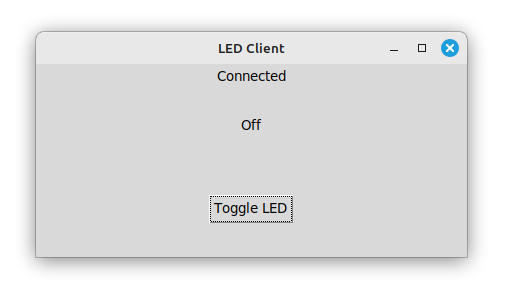
A further, very similar example, ledclient2.py which uses Python GTK+ 3 has also been written, and is in the same directory, it produces an almost identical window.
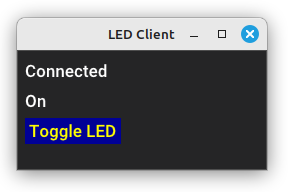
A third, using DearPyGui is given as example ledclient3.py, and (without much attempt to layout the widgets) gives: